Contents Menu Expand Light mode Dark mode Auto light/dark, in light mode Auto light/dark, in dark mode Skip to content
Robin v1.11 documentation
Logo

Contents:

  • Introduction
  • FRACAS | In-service Reliability module
    • Manual failure reporting
    • Export/Import
    • Reliability Assessment
    • Charts and Reports
    • Occurrences reporting
    • Corrective Action
    • FRACAS settings
  • FTA | Fault Tree Analysis
    • Symbology
    • Fault Tree Diagram
    • Computation
    • Fault Tree Treeview
    • Failure Conditions
    • Primary Events Table
    • Comments
    • Statistics and Graphics
    • Reports
    • Import/Export
    • Settings
  • FMECA | Failure Modes, Effects and Criticality Analysis
    • Export/Import
    • FMECA Table
    • FMECA Parts Manager
    • FMES: Failure Modes and Effects Summary
    • FMECA Detection
    • FMECA Comments
    • FMECA Settings
  • RPA | Reliability Prediction Analysis
    • BOM: Bill Of Material
    • EPRP: Electronic Parts Reliability Prediction
    • NPRP: Non-electronic Parts Reliability Prediction
    • Reliability Data Databases (EPRD / NPRD)
    • Settings
  • Maintainability | In-service Maintainability module
    • MSG-3 MSI Analysis
    • MSG-3 Zonal Analysis Procedure
    • Zonal Safety Assesment
    • Maintainability settings
  • Parts Management
  • Interconnection
    • RPA to FMEA
    • FRACAS to FMEA
    • FMEA to FTA
    • FTA to Maintainability
    • FMEA to Maintainability
  • Miscellaneous
    • Profile Page
    • Themes
    • Permissions
    • Notifications
    • Change/Forget Password
    • Two-Factor Authentication (2FA)
  • Issue Reporting
  • Browser compatibility
  • Acronym Glossary
Back to top
View this page

Interconnection

Introduction

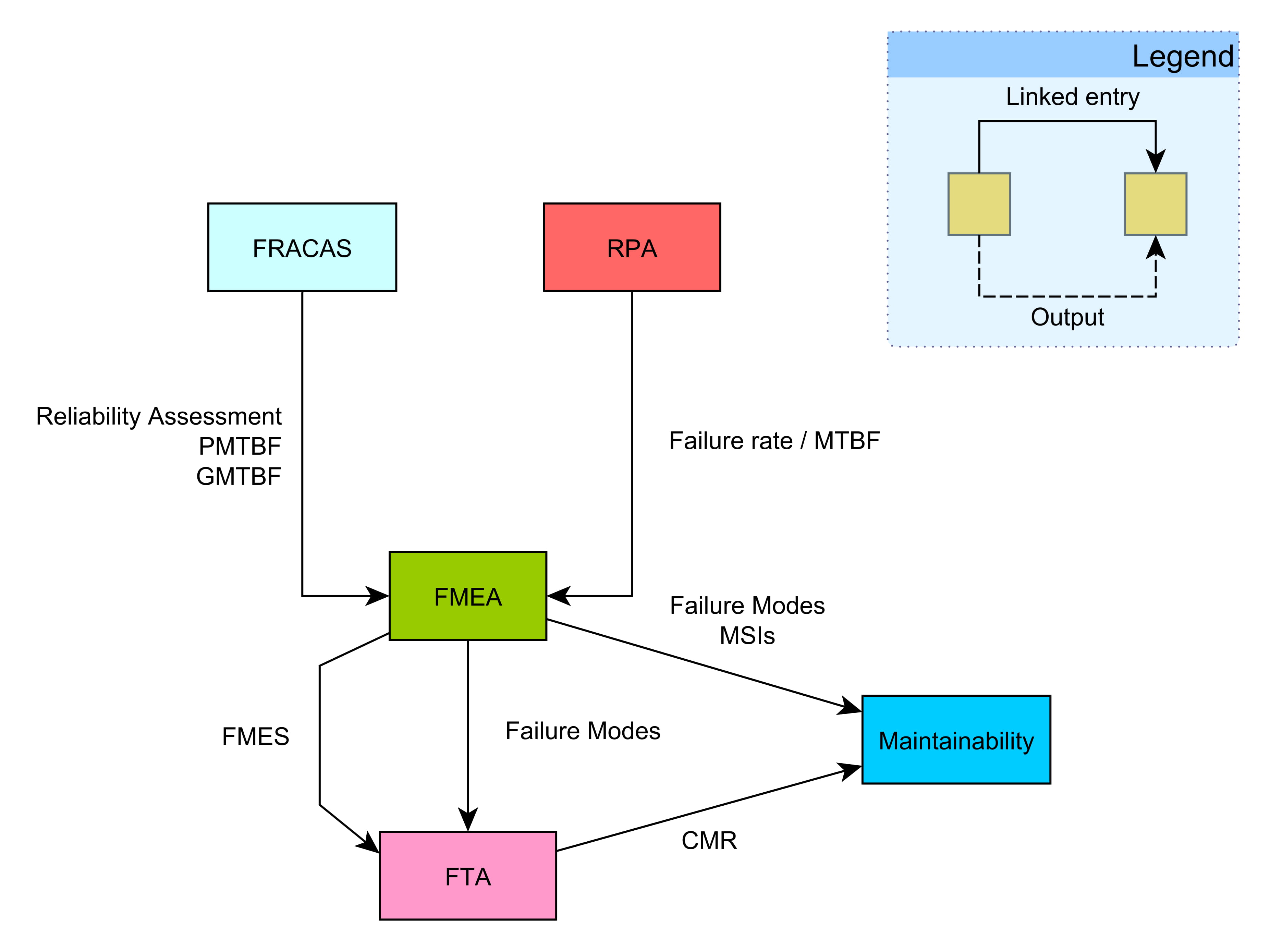
One of the most integral features of our product is that of interconnection between individual modules. It is one that distinguishes us from the competition. Below is a diagram that demonstrates said interconnections.
../_images/interconnection-1.jpg

Content

The content of the interconnection section is:

  • RPA to FMEA
  • FRACAS to FMEA
  • FMEA to FTA
    • Creating a FT from FMEA
    • Adding Child Nodes from FMEA
  • FTA to Maintainability
  • FMEA to Maintainability
    • Adding MSI’s
    • Adding Failures
Next
RPA to FMEA
Previous
Parts Management
Copyright © 2018-2026, DMD Solutions
Made with Sphinx and @pradyunsg's Furo
Last updated on Jul 30, 2026
On this page
  • Interconnection
    • Introduction
    • Content